
AI passport photo tools can make the process feel easy.
Upload a selfie, remove the background, crop the image, adjust the size, clean up the lighting, and download a passport-ready photo in minutes. Compared with going to a pharmacy, post office, or photo center, that sounds convenient.
But passport photos are not profile pictures. They are identity documents.
The goal is not to look better, younger, smoother, or more polished. The goal is to submit a plain, accurate, rule-compliant image that officials, systems, and border officers can match to your real face later.
That matters because a passport photo can cause problems in two places: during passport review, or later when an airline, border officer, visa authority, or biometric system compares the photo to your face.
The real question is not just:
“Can AI make my passport photo look compliant?”
It is:
“Did AI only format my real photo — or did it change the face officials need to recognize?”
This guide explains when digital help may be low-risk, when AI editing becomes a problem, and what to check before submitting a passport photo you may rely on for years.
Quick Answer
Can you use an AI passport photo?
Be careful. Digital tools may help crop, resize, or format a real passport photo, but you should not use AI to create, beautify, heavily retouch, or materially alter the image. Passport photos are supposed to reflect your current appearance, not an improved or synthetic version of your face.
The safest approach is to use a recent, unaltered photo that follows official passport photo rules. If a tool changes your facial features, smooths your skin, adjusts your expression, replaces clothing, changes your hairline, or makes you look different from real life, do not use it for a passport application.
The State Department says unacceptable photos are the number one reason passport applications are put on hold, and photo problems can delay the application until the traveler responds with a new photo. It also says photos must be recent and reflect current appearance.
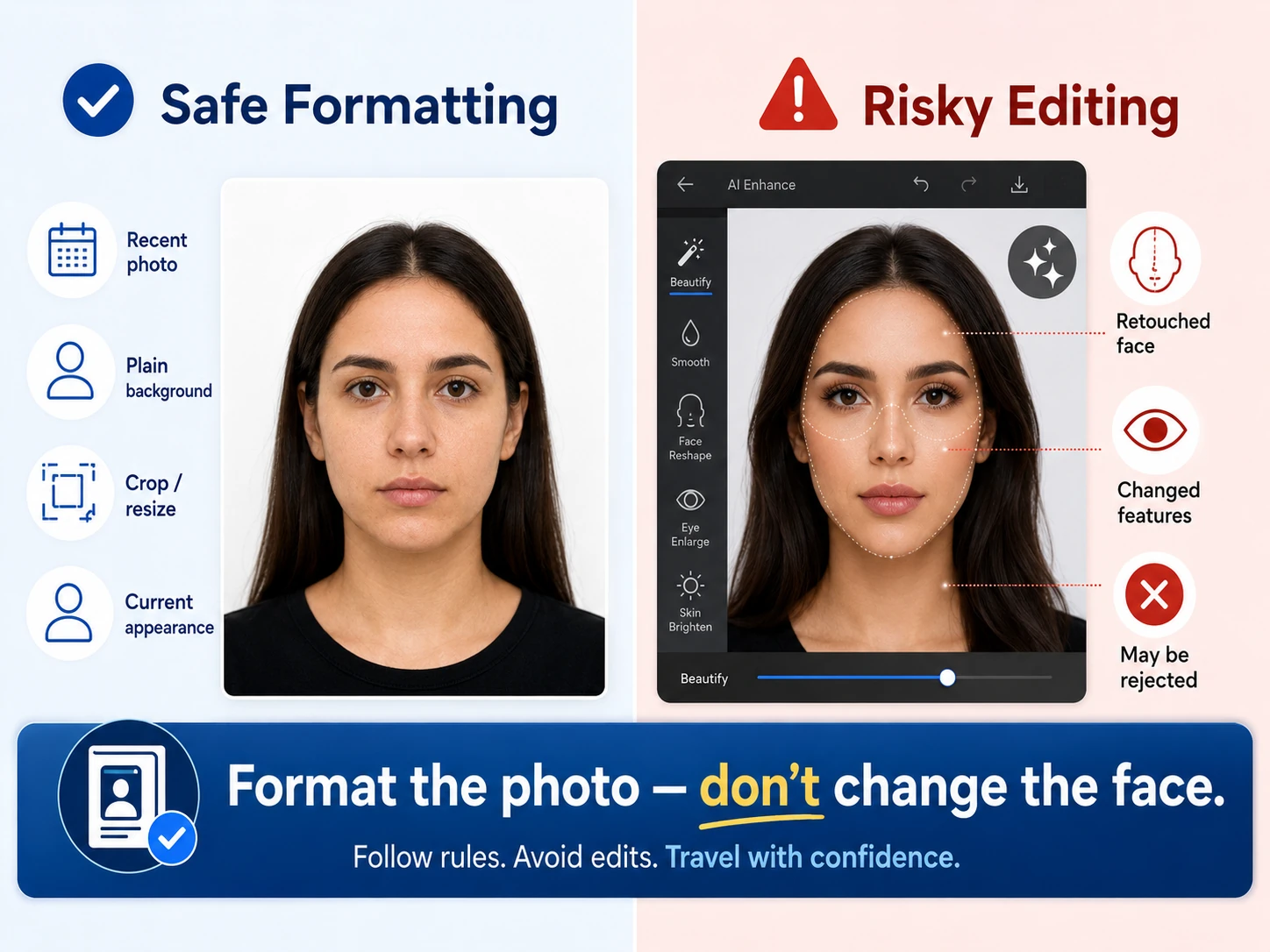
System Insight
A passport photo is an identity-matching tool, not a photo-editing project.
- Formatting help is different from facial editing. Cropping, resizing, and checking image dimensions are not the same as changing how you look.
- AI enhancement can cross the line quickly. Skin smoothing, face reshaping, eye enlargement, expression changes, and beauty filters can alter the image officials need to compare.
- The risk does not end after approval. A photo may be accepted and still create extra scrutiny later if it does not clearly match your current appearance.
- The safest photo is usually the boring one. Recent, plain, evenly lit, neutral, and accurate is better than polished.
The State Department says passport photos should not be enhanced or changed using software or artificial intelligence tools, and travelers should fix lighting or background problems by taking a new photo instead. It also says unacceptable photos are a leading reason passport applications are put on hold.
Where the Risk Starts: Formatting vs Editing
The safest way to think about AI passport photo tools is to separate formatting from editing.
Formatting means the tool helps the image meet technical requirements. It may crop the photo, resize it, center your face, or help you check whether the background and lighting look acceptable.
Editing means the tool changes how you look. That is where the risk starts.
Be especially cautious with:
Skin smoothing that removes texture or changes facial contours.
Face reshaping that alters your jawline, cheeks, chin, or nose.
Eye enhancement that makes your eyes look larger, brighter, or different.
Expression changes that make the face look unlike your normal resting expression.
Background replacement that cuts into hair, ears, shoulders, or the outline of your face.
AI-generated clothing or appearance changes that make the image look synthetic or inconsistent.
Most travelers think of the passport photo as a one-time application requirement. But it can become part of the identity check you rely on for years. A small “improvement” today can become a comparison problem later.
A good rule is:
Use technology to fit the photo requirements — not to improve the face in the photo.
Can You Smile in a Passport Photo?
A slight natural expression may not always create a problem, but the safest passport photo is usually neutral: eyes open, face forward, mouth relaxed, and expression consistent with how officials may see you during document checks.
This matters because the photo may be compared later by airline agents, immigration officers, visa systems, or biometric tools.
A flattering photo is not always the safest travel photo. A plain, accurate, easy-to-compare photo is usually better.
When a Passport Photo App May Still Be Useful
A passport photo app or online tool is not automatically a bad idea.
It may be useful if it helps you understand the required size, crop the image correctly, center your face, check the background, or prepare a printable layout. Those are formatting tasks.
The concern is when the tool goes beyond formatting and starts improving the image.
If the service advertises beauty enhancement, automatic retouching, face cleanup, skin smoothing, AI headshots, clothing replacement, or “perfect” results that make you look more polished, slow down. That may be helpful for a social profile, but it is not the point of a passport photo.
If the tool helps you check the photo without changing your face, it may be useful. If it makes you look better than real life, take a new photo instead.
Traveler Risk
An AI-edited photo may pass an app check but fail the identity test.
The biggest risk is trusting a tool that says the photo is “compliant” while missing that it changed how you look. A passport photo is used to confirm identity, not create a flattering image. If the photo no longer looks like your current, unaltered face, it can cause delays or extra scrutiny later.
What If Your Passport Photo Was Already Accepted?
If your passport has already been issued, the question changes.
A slightly unflattering photo is usually not the problem. Passport photos are often plain, harsh, or awkward. That does not mean the passport is unusable.
The bigger concern is a photo that is blurry, distorted, heavily shadowed, faded, clearly altered, or significantly different from your current appearance.
If the photo looks odd but still clearly looks like you, it may simply be annoying. If it does not look like you, or if you have already had trouble with airline, immigration, cruise, or visa checks, it may be worth reviewing renewal or replacement options before a major trip.
A practical test is:
Would a stranger comparing the passport photo to your face quickly understand that it is you?
If the answer is no, do not wait until the airport or border to find out whether someone else agrees.
How to Decide Whether to Retake the Photo
Before submitting a passport photo, look at it less like a portrait and more like an ID match.
Retake the photo if:
Your face looks noticeably altered. If smoothing, sharpening, enhancement, or AI cleanup changed your features, start over.
The expression is too different. A big smile, exaggerated expression, or closed-mouth-but-not-neutral look may create unnecessary comparison issues.
The lighting changes your face. Harsh shadows, washed-out skin, or uneven lighting can make the image harder to read.
The background edit looks obvious. If hair, ears, shoulders, or the edge of your face look cut out, the photo may appear manipulated.
The image looks like an AI headshot. If it feels too polished, synthetic, or beautified, it is probably not the right passport photo.
The safest fix is usually not more editing. It is a new photo.
Action Step
Use AI only for formatting, not changing your appearance.
Before submitting a passport photo, check whether the tool helped the image meet the rules or changed the face officials need to recognize.
Quick win: If you would not want a border officer comparing the edited image to your real face, do not use it for your passport.
Before You Submit
Check the Travel Document Details Before They Become a Problem
Use the Travel Fine Print checklist to review passport details, photo requirements, ID rules, booking confirmations, insurance documents, and other trip paperwork before a small mistake turns into a travel disruption.
What to Do If a Photo Tool Says “Guaranteed Approval”
Be careful with passport photo tools that make the result sound more certain than it really is.
A tool may check size, crop, background, lighting, and basic image quality. That can be helpful. But a third-party app does not make the final decision for the State Department, a visa authority, an airline, or a border officer.
Even if a tool says the photo is “compliant,” an official reviewer can still reject it if the image does not meet requirements or appears altered.
The safest way to read a “guarantee” is this:
The tool may guarantee its own service, but it cannot guarantee every official review or travel identity check.
Travel Fine Print Takeaway
The safest passport photo is accurate, not enhanced.
AI may help with sizing, cropping, or checking a real photo, but it should not make you look smoother, younger, sharper, more polished, or different. A passport photo needs to help officials recognize you, not improve how you look.
❓Frequently Asked Questions
These questions explain how to think about AI passport photo tools, digital editing, smiling, and photo rejection risk before you submit an image.
Can I use AI to make a passport photo?
Be careful. A tool may help crop, resize, or format a real photo, but you should not use AI to create, enhance, retouch, or materially change your appearance. The photo should show your current, unaltered face.
Can I edit my passport photo?
Cropping or resizing is different from editing your appearance. Avoid skin smoothing, face reshaping, eye enhancement, expression changes, beauty filters, and background edits that make the image look artificial or altered.
Can you smile in a passport photo?
The safest choice is a neutral expression with eyes open and face forward. A large smile or exaggerated expression can make the photo less useful for identity matching and may create unnecessary risk.
What happens if my passport photo is rejected?
Your application may be placed on hold until you submit a new acceptable photo. That can delay passport processing, especially if you are close to a travel date.
Is a passport photo app safe to use?
A passport photo app may be useful if it helps with sizing, cropping, or checking requirements without changing your face. Be cautious if the app retouches, beautifies, enhances, generates, or materially alters the image.
Bottom Line
AI passport photo tools can be helpful when they format a real photo, but risky when they change the person in it.
Cropping, resizing, checking dimensions, and reviewing a plain background may be useful. But AI enhancement, face retouching, skin smoothing, eye changes, expression edits, synthetic clothing, or generated headshots can create problems because passport photos are used for identity matching.
The safest passport photo is not the most flattering one. It is the one that clearly shows your current, unaltered appearance.
The fine print is simple:
Format the photo. Don’t change the face.
Related Guides
Can You Travel With a Damaged Passport? What to Know Before You Fly
Learn when passport condition can create a boarding or entry problem.
Why Some Travelers Are Denied Boarding — Even With a Valid Passport
See why having a valid passport does not always mean your documents are enough for the trip.
Are Passport Expediting Services Worth It? What to Know Before You Pay
Compare official expedited service, urgent passport agency appointments, and private expeditors before paying extra.
Passport Card vs Passport Book: Which One Do You Need for Travel?
Understand when a passport card is enough and when a passport book is the safer choice.
Does Travel Insurance Cover Passport Problems?
Learn when insurance may help with passport issues and when document readiness is usually the traveler’s responsibility.