
You search for a flight.
The price looks good, but you decide to wait.
A few hours later — or sometimes just a few minutes later — you search again and the fare is higher.
That can feel suspicious. It is easy to assume the airline or booking site noticed your interest and raised the price because you searched more than once.
But in most cases, that is not what is happening.
Flight prices are tied to live inventory, fare classes, demand, route activity, booking timing, and availability. The price you saw earlier may have been attached to a limited number of seats in a lower fare class. If that fare disappears, the next search may show a higher price even if you did nothing except refresh the page.
The real question is not just:
“Did the airline raise the price because I searched twice?”
It is:
“Is the same fare still available now?”
This guide explains why flight prices change after searching, whether airlines track your searches, what incognito mode and clearing cookies can and cannot do, and how to make a smarter booking decision when the fare changes.
Quick Answer
Do flight prices go up the more you search?
Flight prices can go up after you search more than once, but that does not usually mean the airline raised the price because of your search history. In most cases, airfare changes because the lowest available fare class sold out, the booking site refreshed live inventory, demand changed, or the airline updated pricing.
Clearing cookies or using incognito mode may prevent some cached or personalized display issues, but it usually does not bring back a fare that is no longer available. The more important question is whether the same seat, fare class, route, date, and booking conditions are still available when you search again.
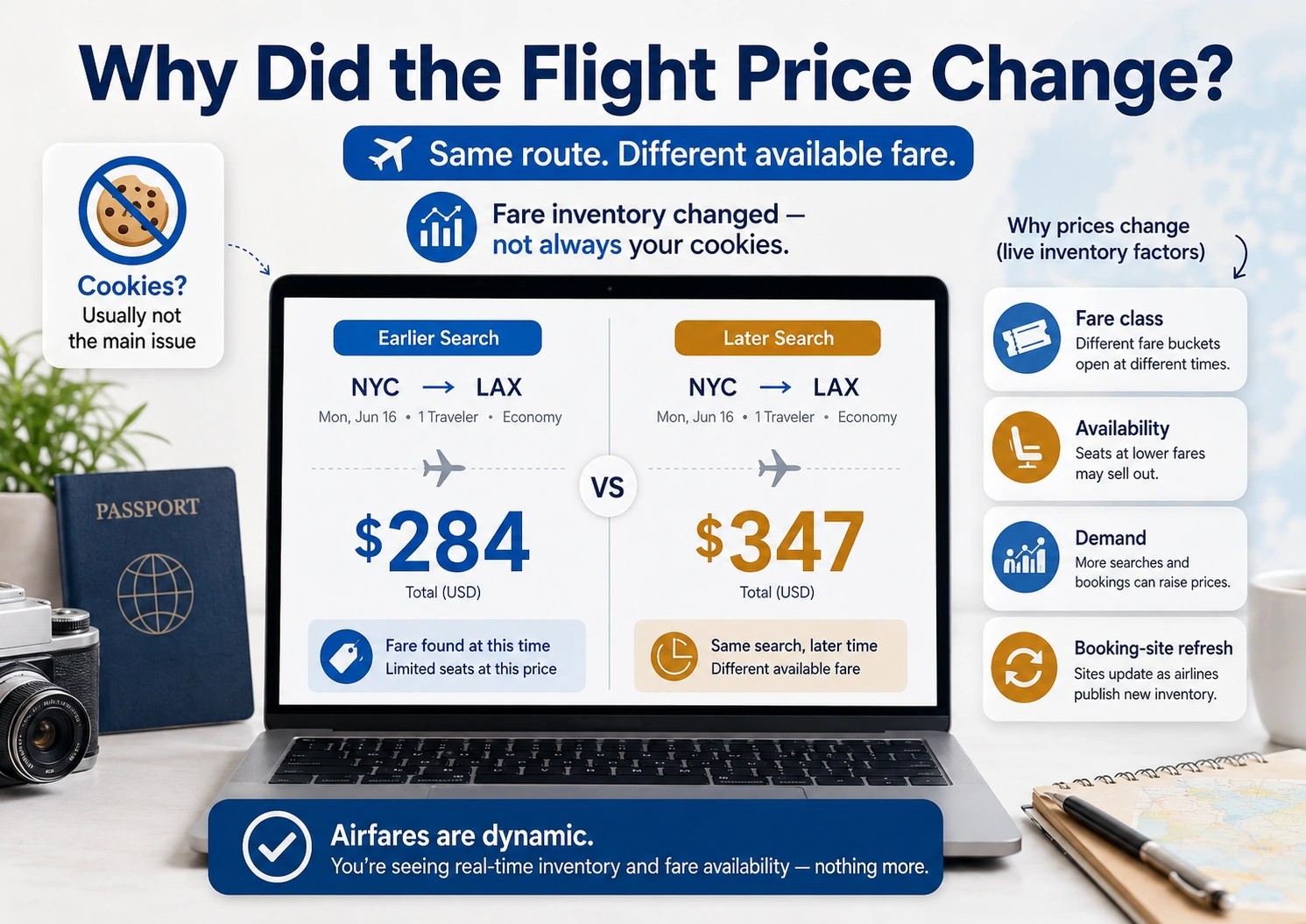
System Insight
Flight prices do not usually work like fixed price tags. They work more like live inventory.
- Fare classes matter because the cheapest visible price may only apply to a limited number of seats.
- Availability matters because another traveler or booking system may claim the lower fare before you return.
- Search timing matters because booking sites may refresh live pricing between searches.
- Demand matters because airlines may adjust pricing based on route activity, dates, seasonality, and booking patterns.
- Cookies are usually not the main issue because a lower fare that is gone from inventory usually cannot be restored by changing browsers.
Why Flight Prices Change After You Search
Flight prices change because airlines do not sell every seat on a plane at the same price.
Instead, seats are divided into fare classes. Each fare class can have its own price, rules, availability, and restrictions. The lowest price you see may only be available for a limited number of seats.
When those seats are gone, the next available fare may be higher.
That can happen because another traveler booked the last seat at that price, the airline adjusted inventory, the booking site refreshed its fare data, or the lower fare class closed between searches.
From the traveler’s point of view, it looks like the price went up because you searched again.
But in many cases, the more accurate explanation is this:
The cheaper fare is no longer available.
That distinction matters because it changes what you should do next. Clearing cookies, switching devices, or using incognito mode may change how a site displays cached information, but it usually cannot reopen a fare class that has already disappeared from live inventory.
Airfare Pricing System
Why the Same Flight Can Show a Different Price Later
When a flight price changes after you search, the cause is usually tied to availability, fare rules, demand, or how the booking site refreshes live data.
Fare Class Changed
The cheapest fare bucket may have sold out, leaving the next higher fare as the lowest available option.
Inventory Updated
Another traveler, travel agency, or booking system may have claimed the fare before you returned.
Demand Shifted
Route activity, seasonality, limited seats, or booking patterns can push the airline to adjust available pricing.
Site Refreshed
A booking site may show cached or estimated pricing first, then update once it checks live availability.
Travel Fine Print check: The price did not always “go up” in the way travelers imagine. Sometimes the lower fare simply disappeared, and the search result is now showing the next available fare.
What Actually Happens When You Search Again
When you search for a flight, the price you see is usually tied to a specific fare class, route, date, cabin, and set of booking rules.
That fare may still be available when you come back.
Or it may not.
If another traveler books the last seat in that fare class, the next search may show a higher price. If the airline adjusts inventory, the fare may change. If the booking site refreshes its data, a price that looked available may disappear once the system checks live availability again.
That is why airfare can feel unstable.
You may see one price in the morning, another price at lunch, and a different price at night. It does not always mean the airline is targeting you personally. It often means the available fare has changed.
This is also why screenshots can be misleading. A screenshot proves what you saw at one moment, but it does not usually hold the fare for you. Until you complete the booking and receive confirmation, the price may still change.
The most important question is not whether you searched before.
It is whether the fare is still available now.
Do Airlines Track Your Searches and Raise Prices?
Travelers often believe airlines raise prices because they searched the same flight more than once.
It is understandable.
The timing can look suspicious. You search once, the fare is lower. You search again, the fare is higher. It feels like the booking site noticed your interest and changed the price.
But airlines do not need to rely on your individual search history to change prices.
They already have live demand signals, booking activity, inventory controls, fare classes, competitor pricing, departure timing, and route-level data. Those factors can change the fare you see without the airline needing to punish one traveler for refreshing the page.
That does not mean travel websites never use cookies, personalization, cached results, location signals, or display testing. They may affect what you see in limited ways, especially across booking sites or devices.
But the bigger issue is usually simpler:
The fare you saw earlier may no longer be available.
So instead of focusing only on whether you were tracked, focus on whether the same itinerary, fare class, baggage rules, seat options, cancellation terms, and total price are still being offered.
Pricing Myth vs Reality
What Feels Like Tracking Is Often a Fare Availability Change
When a fare changes right after you search, it can feel like the airline is reacting to you. But the more common explanation is that the fare, inventory, or booking data changed between searches.
The Traveler Assumption
“The airline raised the price because I searched twice.”
This feels logical because the timing is obvious. You saw one price, came back later, and saw a higher one. That makes the increase feel personal.
The Pricing Reality
The lower fare may no longer be available.
The cheapest fare class may have sold out, the airline may have updated inventory, or the booking site may have refreshed live availability.
The Traveler Assumption
“Incognito mode should bring the old price back.”
Switching browsers can feel like a way to reset the search and avoid being watched by the booking site.
The Pricing Reality
Incognito cannot reopen a fare class that is gone.
Private browsing may reduce cached or personalized display issues, but it usually cannot restore a live airline fare that is no longer available.
Travel Fine Print check: Before blaming cookies, compare the exact itinerary, fare rules, baggage terms, refundability, seat options, and final checkout price. A “different price” may also be a different fare product.
Does Incognito Mode or Clearing Cookies Lower Flight Prices?
Incognito mode and clearing cookies may help avoid some cached search results or display differences, but they are not a reliable way to lower airfare.
That is because the actual airline fare is usually tied to live inventory, not just your browser history.
If the lower fare is still available, you may see it again. If it is gone, changing browsers, clearing cookies, using a different device, or searching in private mode usually will not bring it back.
That does not mean browser behavior is irrelevant.
Travel sites may use cookies, location signals, cached results, account data, or display testing in ways that affect how prices are shown. Different sites may also include or exclude baggage, seat selection, taxes, fees, or booking charges differently.
But those differences are not the same as an airline holding the exact same fare and raising it only because you searched again.
A better use of incognito mode is as a double-check, not as a booking strategy.
Use it to compare whether the same itinerary appears differently across sites, devices, or sessions. Then look closely at the final checkout details before assuming you found the same fare for less.
Why the Price Can Change When You Refresh the Page
A flight price can change after refreshing because the original result may not have been fully confirmed against live availability.
Some booking sites show cached or recently available fares during the search results stage. When you click through, refresh, or move toward checkout, the site may check the airline’s current inventory again.
That is when the price can change.
Sometimes the fare increases. Sometimes the fare disappears. Sometimes the site says the flight is no longer available at that price. Sometimes taxes, fees, baggage terms, or fare restrictions appear differently once the booking path updates.
That can feel like a trick, but it often reflects the difference between a search result and a confirmed booking offer.
Until you complete the booking and receive confirmation, the fare is not locked.
If you see a price that works for your budget, route, schedule, and booking terms, do not assume it will still be there later.
Traveler Risk
Chasing the old price can make you miss the fare that is actually available.
When a flight price jumps after you search, it is natural to try refreshing, clearing cookies, switching devices, or waiting for the lower fare to come back. Sometimes the price may drop again, but sometimes the cheaper fare class is gone.
The risk is spending too much time trying to recover a fare that no longer exists. While you keep searching for the old price, the current fare may rise, the better itinerary may sell out, or the booking terms may become less favorable.
Check the Fine Print
Not sure whether the cheaper flight is still the better deal?
Use the Travel Fine Print Risk Checker to compare airfare changes, baggage rules, seat fees, refundability, booking channel, fare restrictions, and other details that can change the real cost of a flight.
What To Do When a Flight Price Goes Up
When a flight price goes up after you search, do not start by assuming the airline is targeting you.
Start by checking whether you are still looking at the same product.
Compare the exact route, dates, departure times, arrival times, airline, cabin, fare type, baggage rules, seat-selection options, refundability, change rules, and final checkout price. A fare that looks “higher” may include different rules. A fare that looks “lower” may exclude bags, seats, or flexibility you actually need.
If the itinerary is important and the new price still fits your budget, booking may be smarter than waiting for the old price to return.
If you have flexibility, widen the search instead of refreshing the same flight repeatedly. Check nearby dates, alternate airports, different departure times, or fare alerts.
The goal is not to beat the pricing system.
The goal is to avoid making a worse decision because you are frustrated by a moving price.
Action Step
Compare the full fare before deciding whether to wait, book, or keep searching.
When a flight price changes, do not compare only the number you saw in the search results. Compare the total booking terms before deciding whether the new fare is still worth it.
- Confirm the same route, dates, times, and airline.
- Check whether the same fare type is still available.
- Compare baggage rules and carry-on restrictions.
- Check seat-selection costs and boarding benefits.
- Review refundability, cancellation, and change rules.
- Look at the final checkout price, not only the search result.
- Use fare alerts instead of refreshing repeatedly.
- Book when the price, timing, and rules fit your trip.
Quick win: Ask, “Would I still choose this flight at this price with these rules?” If yes, waiting for the old fare may create more risk than value.
Before You Book
Check the full trip cost before the fare changes again.
Use the Travel Fine Print checklist to review fare rules, baggage costs, seat fees, refundability, documents, timing, and booking details before you lock in a flight.
❓Frequently Asked Questions
These questions cover why flight prices change after searching, whether airlines track your searches, whether incognito mode helps, and what to do when a fare goes up.
Do flight prices go up the more you search?
Flight prices can go up after you search more than once, but that does not usually mean the airline raised the price because of your search history.
In most cases, the fare changed because availability, demand, fare classes, or booking-site data changed between searches.
Do airlines track my searches and raise prices?
Airlines and travel sites may use cookies, cached data, location signals, or account information in different ways, but the biggest reason prices change is usually live fare availability.
The lower fare you saw earlier may have sold out, closed, or refreshed before you searched again.
Why did my flight price go up after I refreshed the page?
The original price may have been tied to a lower fare class or cached search result. When you refreshed, the site may have checked live availability again and shown the next available fare.
That can make it look like refreshing caused the increase, but the fare may have changed in the system before or during the refresh.
Does incognito mode lower flight prices?
Incognito mode may reduce some cached or personalized display behavior, but it is not a reliable way to lower airfare.
If the lower fare is still available, you may see it again. If it is gone from live inventory, private browsing usually will not bring it back.
Does clearing cookies help find cheaper flights?
Clearing cookies can sometimes help you compare a cleaner search session, but it usually does not change the airline’s live fare inventory.
It is better to use cookies, incognito mode, or another device as a double-check instead of assuming they will restore a fare that disappeared.
Why did the flight price change on a different device?
The price may have changed because the fare updated between searches, not because the device itself caused a different price.
Also check whether both searches are showing the same airline, fare type, baggage rules, seats, refundability, fees, and final checkout price.
Should I book right away if a flight price goes up?
Not always. First compare the full fare, including route, schedule, baggage, seat fees, refundability, change rules, and final checkout price.
If the new fare still fits your budget and the itinerary matters, booking may be smarter than waiting for the old fare to return. If you are flexible, check nearby dates, alternate airports, and fare alerts instead of repeatedly refreshing the same flight.
Bottom Line
Flight prices can go up after you search more than once, but that does not usually mean the airline raised the fare because of your search history.
In most cases, the price changed because airfare is tied to live inventory.
The lower fare may have sold out. The booking site may have refreshed availability. The airline may have adjusted inventory. Demand may have changed. Or the fare you saw earlier may no longer be available under the same rules.
That is why clearing cookies, switching devices, or using incognito mode is not a reliable strategy for getting the old price back.
The better approach is to compare the full fare: route, dates, times, baggage rules, seat fees, refundability, change terms, booking channel, and final checkout price.
If the fare fits your budget and the itinerary matters, waiting for the old price can be riskier than booking the price that is actually available.
The key is not whether you searched twice.
It is whether the same fare is still available now.
Related Guides
If you are comparing flight prices, watching fares change, or trying to understand why the cheapest flight may not be the best deal, these related guides may also help:
Flight Prices, Fees, and Fare Rules
- Airline Fees Explained: What Travelers Should Check Before Booking
Use this if the lowest fare changes once baggage, seat selection, boarding benefits, or other add-ons are included. - Advance Seat Selection Fees: Why Airlines Charge Extra to Choose a Seat
Helpful if the cheaper fare does not include seat choice or if seat fees change the real cost of the flight. - Can an Airline Force You to Check a Carry-On Bag? What Travelers Should Know
Use this if a cheaper fare, boarding group, or aircraft type could affect whether your carry-on stays with you.
Booking Decisions and Price Risk
- Why the Price You See at Checkout Isn’t Always the Price You Pay
Helpful if the first price you see changes after taxes, fees, booking charges, add-ons, or payment details appear. - Pay Now vs Pay at Hotel: Which Option Is Safer?
Use this if you are comparing prepaid travel pricing, flexible payment options, and what happens when plans change. - Non-Refundable Hotel Rates: What They Mean and When They’re Worth It
Helpful if you are deciding whether a lower price is worth stricter cancellation or refund rules.
Travel Insurance and Refund Problems
- Why Travel Insurance Claims Get Denied — And What to Check Next
Use this before assuming travel insurance will cover a flight, fare change, cancellation, or booking mistake. - Can You Get a Refund on a Hotel Booking?
Helpful if you are comparing flexible vs nonrefundable bookings and want to understand how refund rules actually work.